
What is Passwordless Authentication? When people ask “What is Passwordless Authentication” they mean signing in without typing a memorized password. Instead of a secret you must remember, systems rely on something you have, like a security key or a trusted phone, or something you are, such as a fingerprint or face scan.
Unlike multi factor authentication, which usually still pairs a password with another factor, passwordless removes the password entirely. It uses public key cryptography so the service never stores a reusable password, which makes stolen passwords useless to attackers and reduces successful phishing. For IT security teams, this shifts focus to managing authenticators, verifying device attestation, and integrating new telemetry into incident response.
How passwordless sign-in looks to IT security teams
Technically, passwordless flows still involve authenticators and device-bound secrets, but the security implications are different. The authenticator generates a public key credential that the service verifies without storing any reusable password. This reduces the value of intercepted credentials and forces attackers to target devices or recovery channels instead.
From a security operations view, passwordless changes what telemetry is useful. Logs now show which device attempted to authenticate, attestation results, and whether the request came from a managed endpoint. These signals help security operations center (SOC) analysts validate suspicious activity faster and reduce false positives.
Incident response shifts from chasing stolen credentials to validating device posture, attestation, and anomalous access patterns. For security teams, this often means integrating authenticator telemetry into Security Information and Event Management (SIEM) systems and identity systems to enrich alerts and speed triage.
Common authenticators and what support should know
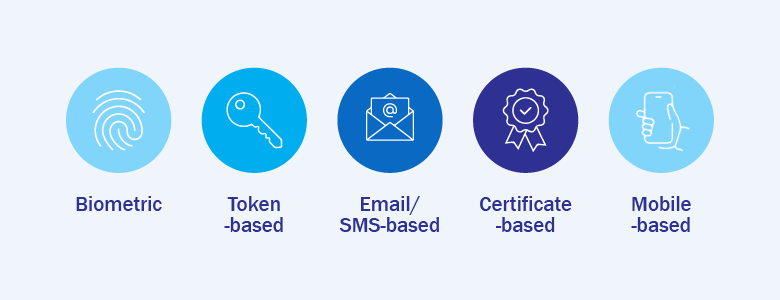
Security teams will most often see three types of authenticators:
- Platform authenticators — these are built into devices, for example a Trusted Platform Module (TPM) in a laptop or a secure enclave on a phone. They are convenient because they are already on the device, but teams should watch device health and how the device proves it is genuine.
- Roaming hardware keys — small physical devices users carry, such as FIDO security keys. In a passwordless setup these keys register a public key with the service and can authenticate the user without any password, because the private key never leaves the device. That makes account takeover much harder, since an attacker would need the physical key and a way to use it. Operationally, keep a record of issued keys, make revocation simple and fast if a key is lost, and plan a replacement workflow so users can regain secure access without risking exposure.
- Mobile authenticators — apps or phone prompts that act as a second trusted device. They are flexible and familiar for users, but you should plan for device loss and safe recovery steps.
Five security and operational benefits security teams typically observe
Adopting passwordless authentication delivers several measurable benefits for IT security teams and operations. These outcomes tend to improve incident detection, reduce attack surface, and provide clearer forensic signals for investigations.
Fewer password reset tickets and shorter resolution time
One of the clearest security benefits is a drop in credential-stuffing and account takeover incidents. Because passwordless removes reusable passwords from the threat equation, automated credential attacks lose much of their value.
This shifts security effort away from cleanup and containment toward prevention and monitoring. Analysts can spend less time confirming whether a credential was exposed and more time on validating device attestations and investigating anomalous access patterns.
Smoother sign-ins across devices and sessions
Passwordless approaches make credential phishing far less effective because there is no reusable secret to harvest. Attackers must either compromise a device or trick a user into exposing a recovery channel, which raises the bar significantly.
For security teams, this translates into fewer phishing-driven compromises and a lower volume of related incident investigations. That allows SOCs to priorities truly anomalous events rather than chasing credential-based alerts.
Clearer device ownership and lifecycle tasks
When authentication is tied to devices, it becomes easier to map identities to hardware and enforce lifecycle policies. This improves governance because teams can revoke device-bound credentials promptly when devices are lost or users leave.
Managing authenticators through a controlled lifecycle reduces orphaned access and improves auditability. Security teams gain clearer evidence when assessing exposure during investigations.
Simpler recovery narratives for users
Public key authentication and attestation provide richer forensic data. Logs can reveal which authenticator was used, whether attestation checks passed, and where an authentication originated from, giving investigators clearer context.
These signals speed triage, help distinguish compromised devices from suspicious behaviour, and improve the quality of incident reports provided to stakeholders.
Reduced phishing surface for users
Because attackers face a higher barrier to reuse credentials, successful account compromises become less common, which in turn reduces opportunities for lateral movement within the network. This reduces blast radius and helps limit the scope of incidents.
Combined with endpoint protections and identity monitoring, passwordless contributes to a stronger, multi-layered defensive posture that makes post-compromise activity harder for adversaries.
Common operational challenges and pragmatic responses

Passwordless brings operational shifts that security teams should plan for. Common challenges include lost or damaged authenticators, enrollment friction, device lifecycle management, and attempts to exploit recovery channels. Preparing lightweight, auditable responses reduces risk without creating heavy overhead.
Practical responses include quick revocation and re-registration workflows, temporary vetted access while an authenticator is replaced, streamlined enrollment processes that balance security and convenience, and recovery procedures that require multiple verifiable signals and audit logging.
Interested in learning more on how you can implement passwordless authentication in your business? Send us a message at marketing@ctlink.com.ph.