Remote work and hybrid setups are normal now, which means access problems show up in the middle of real work. People just want to open the app they need or get help when something breaks. IT teams want the same thing, but with clear control and fewer surprises. A Remote Access Tool is often where those expectations collide.
The friction usually is not caused by one “bad” product. It comes from using one access method for everything, especially when Virtual Private Network (VPN) becomes the default even for cloud apps or simple support tasks. NIST’s guidance on enterprise telework and remote access makes a similar point in a more formal way: remote access is a mix of technologies, policies, and client devices, including BYOD, not just a single gateway.
What people expect from a Remote Access Tool now
Most users judge remote access with three questions. How fast can I connect, does it stay stable, and can I do my work without repeating steps. If the answer is “sometimes,” you get workarounds, shadow tools, and the same tickets coming back every week.
For IT Operations and IT security, that user experience matters because it drives behavior. When the official path is smooth, people follow it. When it is painful, they route around it. The end result is more time spent troubleshooting connectivity than actually fixing the underlying issues.
A simple rule that helps: aim for fewer steps to reach what the user needs, and fewer moving parts that can fail. That approach makes remote access easier to support and easier to secure.
Why VPN based remote access can feel slow and risky at the same time
VPN still has a place, but it struggles when it is treated as the universal answer. A traditional remote access VPN creates an encrypted tunnel so a device can reach internal resources as if it were on the corporate network. That model was built for a world where most “important” apps lived inside the perimeter. Today, many apps are SaaS, many endpoints are mobile, and many users only need a narrow set of services.
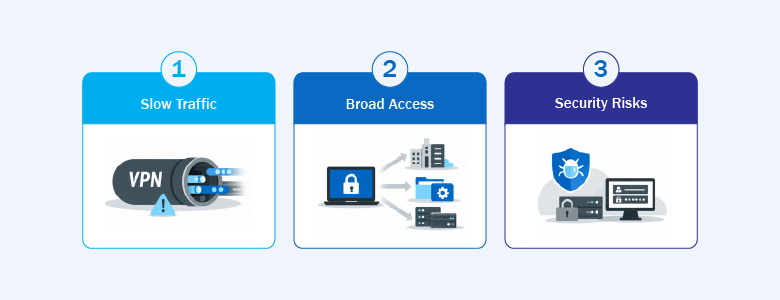
Three friction points tend to show up.
Broad access after login. VPN commonly grants network level access once a user authenticates, which can increase lateral movement risk if credentials or endpoints are compromised. VPN versus Zero Trust Network Access (ZTNA) comparisons frequently call out this difference, with ZTNA positioned as application level access instead of network level reach.
Backhauling cloud traffic. When users connect to the VPN and then go back out to cloud services, they can feel the extra distance as latency. Several VPN versus ZTNA discussions highlight that VPN backhauling can increase latency, while ZTNA approaches often connect users to applications more directly through cloud points of presence.
Operational overhead. VPN clients, profiles, split tunneling decisions, and exception handling add up. NIST emphasizes that remote access security includes securing client devices, including BYOD, because endpoints are part of the risk, not just the tunnel.
None of this means “throw out VPN.” It means VPN should be used where it fits, and supplemented where it does not.
Remote Access Tool types that solve different jobs

“Remote access tool” is a broad label, so it helps to sort tools by what they connect you to. This keeps the keyword natural because the discussion stays focused on tool choice and fit.
VPN tools connect you to the network
VPN is best when a user or admin genuinely needs network presence to reach multiple internal systems, especially older applications designed around on premises connectivity.
Because VPN gateways are high value targets, NSA and CISA have published guidance on selecting and hardening remote access VPN solutions, including reducing attack surface, limiting exposed features, and monitoring access.
ZTNA tools connect you to specific applications
ZTNA aims to connect users to specific apps rather than placing them on the network. This is often described as application level access with tighter control, compared to VPN’s network level model.
ZTNA tends to fit well when users mainly need a defined set of apps, especially in cloud heavy environments. Many organizations keep VPN for a smaller set of legacy needs and use ZTNA for everyday app access.
Remote control tools connect IT to devices
Remote control is for device support. It is not about routing app traffic. It is about letting IT troubleshoot an endpoint, run admin actions, and help users without being on site.
This category can also reduce tool juggling when it is integrated into an endpoint management platform. NinjaOne’s documentation describes remote control built into the broader NinjaOne platform, where technicians can start sessions from the device dashboard and keep remote support inside the same environment used for device management. Industry coverage also describes features such as background mode and technician tools that allow maintenance without disrupting the user, which is a practical benefit when support teams handle high ticket volume.
How to choose the right Remote Access Tool without forcing one tool to do everything
A good remote access setup usually includes more than one approach, but each approach has a clear purpose.
- If the goal is broad internal network access, a VPN style tool may still be required for certain systems.
- If the goal is access to a specific application, ZTNA often fits better because it narrows exposure and can reduce backhauling.
- If the goal is support and maintenance on endpoints, remote control tools are the right fit because they are built for technician workflows.
This framing also makes rollouts easier. Users understand why one method is used for certain apps and another is used when IT needs to fix a device. Security teams can apply controls more consistently because access paths are clearer.
6 practical ways to reduce VPN pain and improve remote access
These changes are meant to be realistic. You can apply them gradually without redesigning everything.
Make multi factor authentication the baseline for remote entry points
Remote access is a common target for credential theft. CISA explains that multi factor authentication (MFA) reduces unauthorized access by requiring more than a password, which helps even when a password is compromised.
If you need a practical starting point, begin with privileged accounts and the most exposed remote services, then expand. Consistency matters more than perfection.
Narrow access when users only need specific apps
If a user only needs one or two applications, granting broad network access can be more exposure than benefit. VPN versus ZTNA comparisons often highlight this distinction, where ZTNA is positioned to grant access to specific applications rather than placing users on the network.
This also improves operations. It is easier to reason about who can access an app than who can reach large segments of the network.
Reduce backhauling for cloud heavy workflows
Many “VPN is slow” complaints are traffic flow problems. If cloud bound traffic must traverse a central gateway, latency increases, and the gateway becomes a bottleneck. This traffic flow difference is frequently highlighted in VPN versus ZTNA discussions.
The goal is not to optimize every path. The goal is to remove the most obvious slow routes for the most common workflows.
Treat endpoint hygiene as part of the remote access plan
Remote access reliability and security depend heavily on device health. NIST’s telework and remote access guidance emphasizes securing client devices, including BYOD, because endpoints are part of the threat surface.
From a practical standpoint, this usually means consistent patching, visibility into device status, and clear baselines for managed versus unmanaged endpoints.
Improve session visibility for remote control support
Remote control sessions are powerful. Logs, role based permissions, and clear session indicators reduce risk and also help support teams resolve disputes and audits faster because there is a record of what happened.
This does not need to feel like a compliance project. It is basic operational hygiene for a tool that can change settings and move files on endpoints.
Reduce tool sprawl when it slows response time
Tool sprawl shows up as duplicated permissions, inconsistent policies, and constant context switching during incidents. Consolidation is not mandatory, but it can help when the same team is responsible for monitoring, patching, and remote support.
NinjaOne frames remote control as part of a broader platform, which is one example of how integrated tooling can reduce “jumping between systems” during support work.
A steady way to modernize Remote Access Tool strategy
The most sustainable improvements are incremental. Keep VPN for the systems that truly require network presence. Use application level access where it reduces exposure and improves performance. Standardize remote control for endpoint support so tickets resolve faster.
NIST positions remote access as an enterprise capability that includes policy, technology selection, and client device security. Keeping that broader view helps IT Operations and IT security stay aligned on outcomes: fewer failures, better visibility, and access that users will actually stick with.
Interested in learning more about remote access tool solutions like NinjaOne? Contact us at marketing@ctlink.com.ph to set up a consultation with us today!