Microsoft 365 Email remains one of the most relied on tools for getting work done in Philippine organizations. Even with chat apps and workflow systems available, email still anchors approvals, coordination, and external communication. When teams treat email as part of their operational process rather than just a personal inbox, it becomes far more reliable.
The sections below cover five common industry workflows where Microsoft 365 Email is used daily across PH SMB to mid-market organizations. These are practical patterns seen in real operations, not feature lists, and they reflect how teams actually work.
Healthcare Operations: Coordinating Care and Scheduling
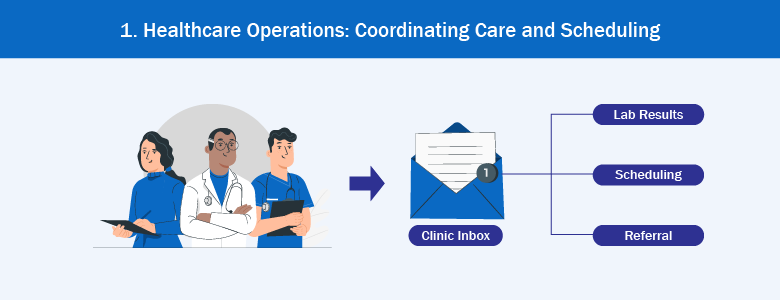
Clinics, hospitals, and diagnostic centers rely heavily on email to coordinate care, referrals, and scheduling. Microsoft 365 Email supports this by allowing departments to work from shared mailboxes instead of individual accounts.
Referral requests, lab results, and coordination messages often arrive at a central inbox monitored by rotating staff. This ensures continuity even when shifts change. Shared calendars connected to these mailboxes allow visibility into clinic availability without exposing private staff details.
Consistency matters in healthcare communication. Clear subject line formats and disciplined thread management help staff quickly identify urgent versus routine messages. Guidance from organizations like NIST consistently emphasizes structured handling of sensitive information, which applies directly to how healthcare teams manage email.
Manufacturing and Procurement: Managing Suppliers and Approvals
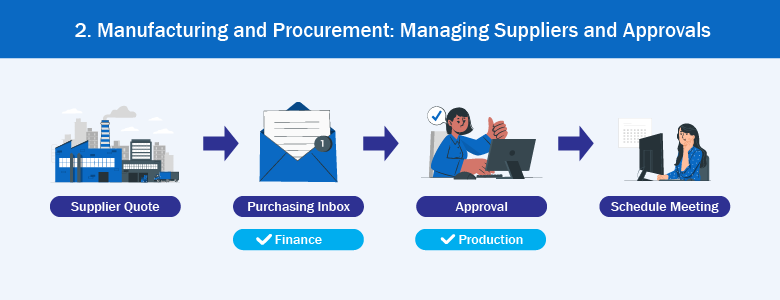
Manufacturing teams depend on email for supplier coordination, purchase approvals, and delivery timelines. Microsoft 365 Email often acts as the bridge between procurement, finance, and production.
Shared purchasing inboxes allow multiple staff to review quotes and requests without forwarding messages back and forth. Categories and rules help separate urgent supply issues from standard inquiries. This reduces delays when one person is unavailable.
Calendar integration also supports faster resolution. Scheduling quick meetings directly from an email thread helps teams clarify issues before they impact production schedules. Exchange Online provides this capability without introducing additional tools or complexity.
Banking and Financial Services: Handling Requests with Accountability
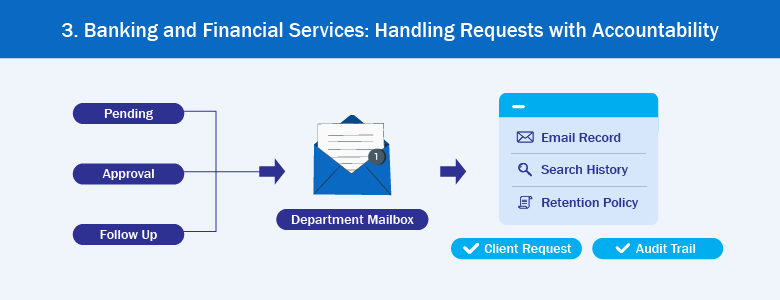
In financial and banking environments, email communication needs to be timely, traceable, and properly retained. Microsoft 365 Email supports these requirements through controlled access, retention policies, and search functionality.
Department mailboxes allow branches or internal teams to submit requests without depending on a single staff member. Flags and categories help track pending approvals and follow‑ups, reducing the risk of missed deadlines.
Email remains a common source of operational risk when poorly managed. CISA regularly highlights email as a vector for errors and misuse, which is why structured inbox ownership and clear response practices are critical in financial workflows.
Logistics and Distribution: Coordinating Movement and Exceptions
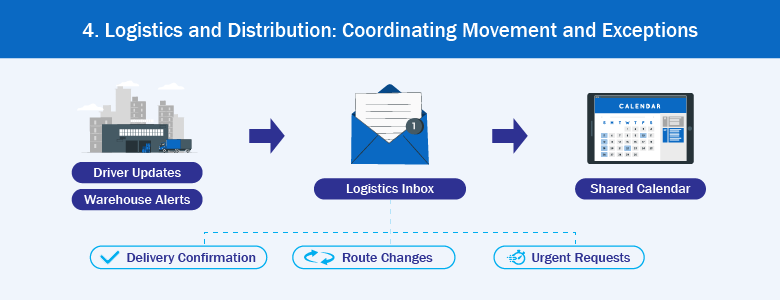
Logistics operations often rely on email for dispatch updates, delivery confirmations, and exception handling. Microsoft 365 Email provides a centralized way to manage these messages without replacing existing transport or warehouse systems.
Shared inboxes receive updates from drivers, partners, or field teams. Because the inbox belongs to the role rather than an individual, work continues smoothly across shifts. Messages stay visible to everyone responsible for the next action.
Shared calendars also help teams coordinate pickups, maintenance windows, and urgent reroutes. This reduces long email chains and keeps decisions documented in one place.
Retail and Customer Support: Balancing Speed and Consistency
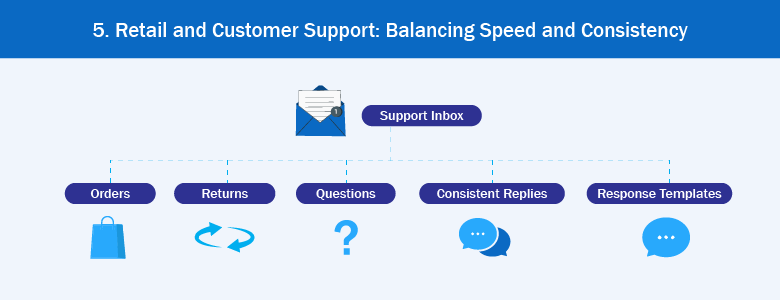
Retail and customer support teams handle a steady flow of inquiries related to orders, returns, and service issues. Microsoft 365 Email supports this work through shared mailboxes and consistent response practices.
Support teams often separate messages by category to prioritize urgent cases. Templates help maintain consistent tone and information while still allowing personalization when needed. This speeds up response time without making replies feel robotic.
Retention and search capabilities also play a role. Keeping a clear record of customer communication helps resolve disputes and follow‑ups efficiently, protecting both the business and the customer.
Choosing the Right Email Setup for Each Workflow
Across these five industries, one decision comes up repeatedly: whether to use a shared mailbox, a Microsoft 365 group, or an email alias. Each serves a different operational purpose.
Shared mailboxes work best when multiple people need full visibility and reply control. Microsoft 365 Groups are useful when a team needs more than a shared email address. They give the team a shared inbox and calendar, and they can also include shared files and a shared space for conversations. Aliases help route messages without creating new inboxes.
- Distribution list: For sending the same announcement or update to many people at once.
- Security group: For deciding who can access something, like a file, folder, or app.
- Microsoft 365 Group: For a team that needs a shared email address and shared tools to work together, like a calendar and files.
The best results come when IT teams align email configuration with how work already flows, rather than forcing teams to adapt to a tool structure that does not match their day‑to‑day tasks.
Making Microsoft 365 Email Work as an Operational Tool
Email feels ordinary, which is why it is often underestimated. But when Microsoft 365 Email is set up around real workflows, it becomes a dependable coordination layer rather than a daily frustration.
For Philippine SMBs and mid‑market organizations, the goal is clarity. Clear inbox ownership, consistent handling, and realistic habits reduce missed messages and duplicated work. When email supports the process instead of getting in the way, teams can focus on delivering results.
Interested in learning more about Microsoft 365 other tools that can help your business? Contact us at marketing@ctlink.com.ph to set up a consultation with us today!