
Most companies didn’t plan to go hybrid. It just happened. The ERP stayed on the office servers, the new customer portal went to the cloud, and a few apps landed somewhere in between. Now IT is watching traffic in three or four places, and when something slows down, nobody is quite sure where to look first.
This is where an ADC load balancer earns its spot. It sits in front of your apps, wherever they live, and decides where each user’s request should go. For teams running apps both on-prem and in the cloud, it brings five clear benefits, from faster apps to automatic failover when a site goes down.
What Is a Load Balancer, and Where Does the ADC Come In?
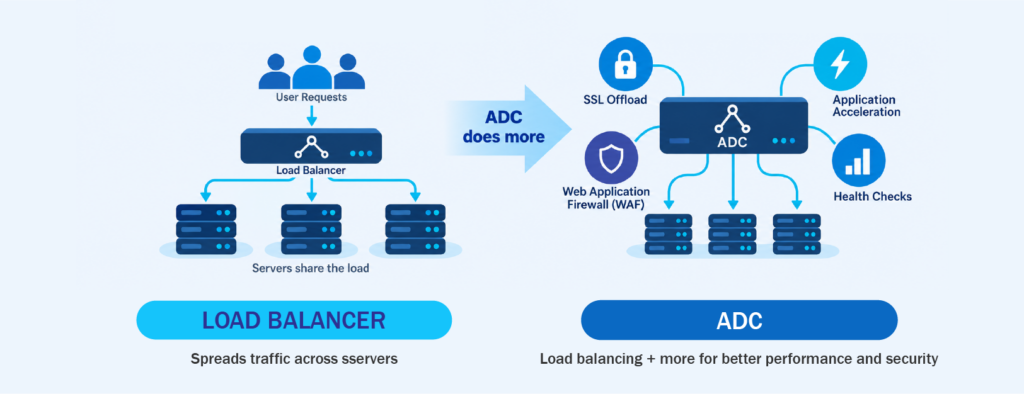
A load balancer spreads incoming traffic across several servers so no single server carries all the work. If one server gets too busy or stops responding, the load balancer sends new requests to the others. Users just see an app that works.
An application delivery controller, or ADC, is a load balancer that takes on extra jobs. On top of spreading traffic, it can handle encryption for your servers, speed up page loads, and filter out harmful requests before they reach your apps. When people say “ADC load balancer,” they mean this all-in-one tool, with load balancing at the core and everything else built around it. A basic load balancer usually works fine inside one location, but an ADC load balancer can route traffic across different sites and clouds, which is exactly what hybrid teams need.
Why Hybrid Setups Make Traffic Harder to Manage
When everything ran in one server room, traffic was easy to follow. With hybrid, some requests go to your data center, some go to the cloud, and some apps depend on both at once.
Each environment also brings its own tools. Your cloud provider has its own load balancing options, your on-prem side might have an older appliance or nothing, and the settings rarely match. Over time, the rules for who goes where get scattered across different consoles.
Capacity is uneven too. Cloud resources can grow when traffic spikes, but on-prem servers can’t, at least not quickly. Without something steering traffic with both in mind, you can end up with an overloaded data center during payroll cutoff while cloud capacity you’re already paying for sits idle.
5 Benefits of an ADC Load Balancer for Hybrid and Cloud Apps
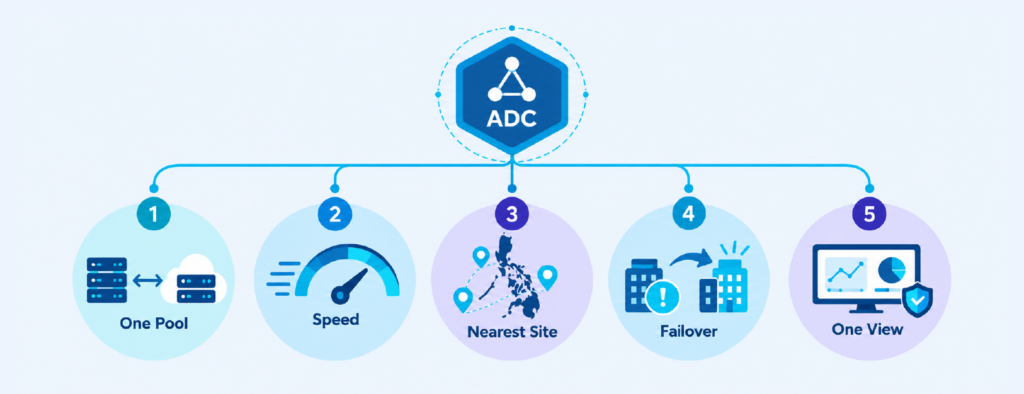
1. Your on-prem and cloud servers work as one team
An ADC load balancer sits between your users and your apps. Users connect to it, and it passes each request to the server best placed to handle it. Since it doesn’t much care whether that server is a physical box in your server room or a virtual machine in the cloud, you can treat both as one pool.
To know which servers can take the work, the ADC runs health checks. These are regular tests to see if a server is responding properly, from simply checking that it answers to loading a page and confirming the right content comes back. If a server fails, the ADC stops sending users there until it recovers. It can also keep each user on the same server for their whole visit, called session persistence, so logins and shopping carts don’t reset halfway through.
2. Apps run faster because servers do less heavy lifting
Encrypting and decrypting secure (HTTPS) traffic takes a fair amount of processing power. An ADC load balancer can take over that job, called SSL offload, so your servers can focus on running the app. Many ADCs also compress and cache common content, which means fewer repeat requests reach your servers in the first place.
This makes a real difference for older on-prem servers already close to their limits. Just keep the ADC’s encryption settings in line with current guidance, like NIST’s recommendations for TLS, since it becomes the front door for those connections.
3. Users reach the closest and healthiest site
Regular load balancing picks the best server inside one location. Global server load balancing, or GSLB, goes a step higher and picks the best location first, whether that’s your on-prem data center, a cloud region, or a second data center.
It decides using rules you set, like which site is healthy, which one is closest to the user, and which one has room to spare. If your users are spread across Luzon, Visayas and Mindanao, GSLB sends each one to the location that responds fastest. Users only need one address for an app, and the ADC load balancer works out where to send them, so the hybrid setup feels like one system.
4. Failover happens on its own when a site goes down
Failover is what happens when one location goes down and traffic moves to another. Without an ADC, this is often manual. Someone notices the outage, changes network settings, and waits, usually at the worst possible hour.
With an ADC load balancer, you can set one site as active and another as standby. If the main site stops passing health checks, traffic moves to the standby automatically. For Philippine businesses, where typhoons, floods and power interruptions can knock a site offline, a cloud site ready to take over is a practical safety net.
One caveat: failover only helps if the standby site has what users need. The ADC moves traffic, but it doesn’t copy your data, so backups and replication still have to keep the second site current. NIST SP 800-34, the federal contingency planning guide, is a good reference for working out how long each app can afford to be down.
5. Traffic and security are managed in one place
Instead of jumping between a cloud console, an on-prem appliance and a separate firewall, your team sees traffic across environments from one dashboard. That makes it much easier to tell why an app is slow or where a problem started. Security gets simpler too. Many ADCs include a web application firewall, or WAF. A regular firewall decides what can enter your network, while a WAF looks at the web requests themselves and blocks ones that match known attack patterns, like those on the OWASP Top 10 list of common web app risks.
Running the WAF on the ADC load balancer gives your apps the same protection on-prem and in the cloud. It can also help absorb traffic floods used in denial-of-service (DDoS) attacks, though CISA recommends layered protection that often involves your internet provider as well.
Things to Keep in Mind Before You Set One Up
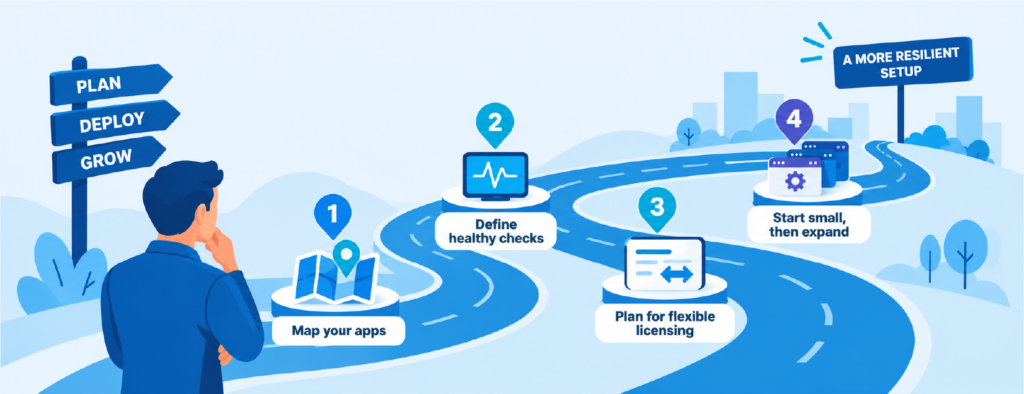
A bit of groundwork early saves a lot of rework later:
- Map which apps live where, and which ones depend on each other across environments.
- Decide what “healthy” means for each app so health checks test something meaningful.
- Look at how licensing works if you expect to move workloads between on-prem and cloud.
- Make sure your team can manage the ADC comfortably without specialist scripting skills.
Watch out for latency too. If an on-prem app keeps calling a database in the cloud, no ADC load balancer will hide that delay. And start small: put one or two important apps behind the ADC, get health checks and failover right, then bring the rest over.
Keeping Hybrid Apps Steady with CT Link
CT Link helps Philippine businesses bring their on-prem and cloud apps under one easier-to-manage layer with EdgeNexus, an ADC load balancer that runs on-premises, in the cloud, or both. It includes global server load balancing, a built-in WAF, and flightPATH for setting traffic rules without writing code, and its licenses can move between on-prem and cloud as your setup changes.
If your apps are starting to feel scattered, our team is happy to talk through what would fit your environment.
Frequently Asked Questions
What is an ADC load balancer?
It’s an application delivery controller with load balancing at its core. It spreads traffic across servers and adds features like health checks, SSL offload and a web application firewall.
Is an ADC the same as a load balancer?
Not quite. Every ADC does load balancing, but not every load balancer is an ADC, since an ADC adds performance and security features on top.
Do I still need an ADC if my cloud provider has load balancing?
Cloud load balancers work well inside that one cloud. If your apps run across on-prem and cloud, an ADC load balancer gives you one set of rules and one view across both.
Can an ADC load balancer handle failover between on-prem and cloud?
Yes. With global server load balancing, it can move users to a healthy site automatically when another goes down, as long as the standby site has current data.